I compared 7 tablets for work. Here’s what to consider before leaving your laptop behind
Editorial independence is core to our work. Some links may earn us a commission, without influencing our opinions.
I compared 7 tablets for work. Here’s what to consider before leaving your laptop behind
Find out what to consider when choosing a tablet for work, from everyday tasks and multitasking to portability and accessories.
Updated on: Sep 28, 2026, 12:28:10 IST
Prefer HTon Google
Share via
Copy link
Our Picks
FAQs
Our Picks
| Product | Rating | Price |
|---|---|---|
Apple iPad Air 27.59 cm (11″) (M4): Liquid Retina Display, 128 GB, 12MP Front/Back Camera, Wi-Fi 7 with Apple N1, Touch ID, All-Day Battery Life — StarlightView Details
|
₹89,900 |
|

|
Check Offers | |
| Lenovo Yoga Tab Plus Smartchoice AI Tablet with Pen + Keyboard |12.7" Display, 3K Resolution, 144 Hz|16GB RAM, 512GB ROM|Snapdragon 8 Gen 3|10200 mAh|6 Speakers|USB 3.0 with DP-Out|1Year ADP Free|TealView Details
|
||
|
|
Check Offers | |
| OnePlus, Pad 4, 13.2 inch (33.53 CM), LCD, 12GB RAM, 512GB ROM, WiFi, 8 Speakers, Snapdragon 8 Elite Gen 5, Dune Glow, AI EnabledView Details
|
||
|
|
Check Offers | |
| XIAOMI Pad 8 Nano Texture, 11.2 -inch (28.44 CM), LCD 3.2K, 12GB RAM, 256GB ROM, Wi-Fi, Quad Speakers Dolby Atmos, Supports Focus Pen Pro, Graphite Grey, AI EnabledView Details
|
||
|
|
Check Offers | |
| Samsung Galaxy Tab A11+, 27.82 cm (11 inch) Display, 8 GB RAM, 256 GB Storage, 90Hz Refresh Rate, AI with Google Gemini, Dolby Atmos, Quad Speakers, Wi-Fi Tablet, GrayView Details
|
||
|
|
Check Offers |
View More

Research-Backed Choices
Every product we recommend is chosen through a combination of Primary Research and Secondary Research.
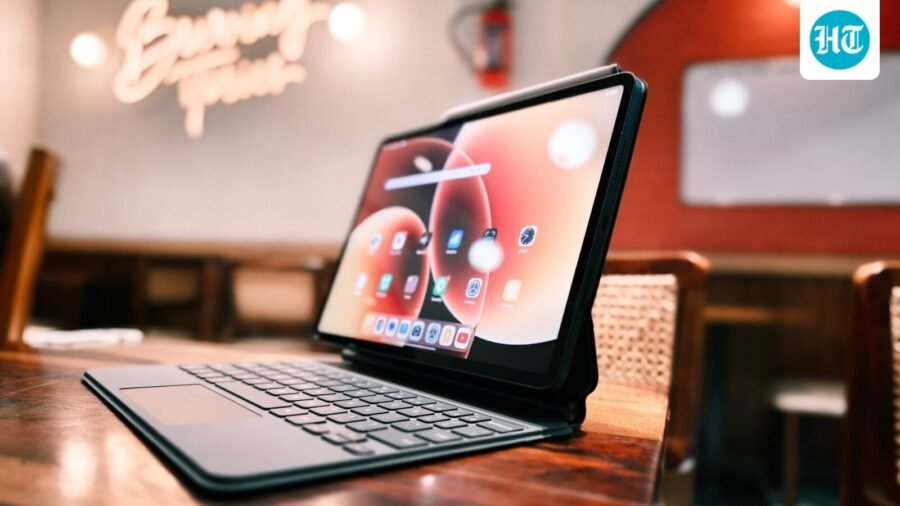
A tablet can be a useful work companion for reading documents, replying to emails, joining Meet and Zoom calls, reviewing presentations and taking notes. With a keyboard and stylus, some models can also handle a fair amount of writing and document editing without requiring you to carry a laptop everywhere. Actually, the right choice depends on your workload. A large display and desktop-style multitasking can help if you regularly work across several apps, while a lighter tablet may be more convenient for meetings and travel. Here I've covered seven options from Apple, Lenovo, OnePlus, Xiaomi, Samsung and Redmi. They range from compact tablets for everyday tasks to larger models with powerful processors and productivity-focused accessories. Check the software, keyboard support and connectivity before deciding.
1. Apple iPad Air 27.59 cm (11″) (M4): Liquid Retina Display, 128 GB, 12MP Front/Back Camera, Wi-Fi 7 with Apple N1, Touch ID, All-Day Battery Life — Starlight
Loading Suggestions…
The 11-inch iPad Air is a compact option for work that involves documents, email, video calls and creative apps. Its M4 chip provides plenty of processing headroom, while the Liquid Retina display supports Apple Pencil input for handwritten notes and markups. The 128GB Wi-Fi model listed here is portable, but a keyboard and stylus are separate purchases.
Specifications
Display
11-inch Liquid Retina
Resolution
2360 x 1640 pixels at 264 ppi
Chip
Apple M4
Memory
12GB unified memory
Storage
128GB
Battery life
Up to 10 hours of surfing the web on Wi-Fi or watching video
Reasons to buy

Strong performance for multitasking and demanding productivity apps
Compact size makes it easy to carry between meetings
Supports Apple Pencil Pro and Apple Pencil (USB-C)
Reason to avoid

Keyboard and Apple Pencil are sold separately
The 128GB model offers less room for large offline files than higher-capacity versions
iPadOS workflows may not replace a laptop for every desktop application
What are buyers saying on Amazon?
Customers are highly satisfied with the iPad Air’s performance, particularly the M4 chip’s speed and smooth multitasking. The Liquid Retina display also receives praise for its vibrant visuals. Buyers say it works well for a range of activities, including work, gaming and creative tasks.
Why should you choose this product?
The iPad Air is worth considering if you want a portable tablet with powerful hardware and a broad selection of productivity and creative apps. It suits users already invested in Apple devices, especially those who plan to add a keyboard or Pencil.
2. Lenovo Yoga Tab Plus Smartchoice AI Tablet with Pen + Keyboard |12.7" Display, 3K Resolution, 144 Hz|16GB RAM, 512GB ROM|Snapdragon 8 Gen 3|10200 mAh|6 Speakers|USB 3.0 with DP-Out|1Year ADP Free|Teal
Loading Suggestions…

Our Principles
Full Transparency
Every product review clearly lists the Pros and Cons, giving you a balanced view.
Brand Confidence
We focus on products from brands with a proven reputation and long-standing market trust.
The Lenovo Yoga Tab Plus is a large-screen productivity bundle that includes a keyboard and pen, making it ready for typing and handwritten notes out of the box. Its Snapdragon 8 Gen 3 processor, 16GB RAM and 512GB storage give it room for demanding apps and large files. The 12.7-inch 3K display is also suited to working across documents and windows.
Specifications
Display
12.7-inch 3K LTPS
Resolution
2944 x 1840
Refresh rate
144Hz
Processor
Qualcomm Snapdragon 8 Gen 3
RAM
16GB LPDDR5X
Storage
512GB UFS 4.0
Battery
10,200mAh
In the bundle
Keyboard and pen
Reasons to buy
Keyboard and pen are included in this listing, reducing the need for separate purchases
Large, high-resolution display gives documents and split-screen apps more room
16GB RAM and 512GB storage suit heavier multitasking and file storage
Reason to avoid
The large display and included accessories make the full setup less compact to carry
Wi-Fi-only connectivity means you will need a hotspot when away from a known network
What are buyers saying on Amazon?
Customers describe the tablet as a premium Android device, praising its battery life, sound quality and overall package. Some say the battery can last up to two days, while feedback on the display and performance is mixed. A few buyers report operating-system crashes.
Why should you choose this product?
The Yoga Tab Plus stands out as a ready-to-work bundle, with a keyboard and pen included alongside generous memory and storage. It is worth considering if you want a large Android tablet for typing, annotating documents and multitasking.
3. OnePlus, Pad 4, 13.2 inch (33.53 CM), LCD, 12GB RAM, 512GB ROM, WiFi, 8 Speakers, Snapdragon 8 Elite Gen 5, Dune Glow, AI Enabled
Loading Suggestions…
The OnePlus Pad 4 is designed for users who need a large workspace and substantial processing power. Its 13.2-inch 3.4K display, Snapdragon 8 Elite Gen 5 platform and 12GB RAM are suited to demanding apps and multi-window work. The 512GB model also leaves room for documents and offline files, though its size makes it less convenient than smaller tablets on the move.
Specifications
Display
13.2-inch 3.4K
Refresh rate
144Hz
Processor
Snapdragon 8 Elite Gen 5
RAM
12GB
Storage
512GB
Battery
13,380mAh
Accessories
Stylo Pro and Smart Keyboard supported
Reasons to buy
Large display provides more space for multitasking and document work
Powerful processor and 12GB RAM suit demanding apps
512GB storage accommodates a substantial collection of work files
Reason to avoid
Large size is less convenient for one-handed use and compact bags
Keyboard and stylus accessories may add to the overall cost
What are buyers saying on Amazon?
Customers praise the OnePlus Pad 4’s display, describing its colours and viewing experience positively. Performance and battery life also receive favourable feedback, with buyers appreciating its speed for work and other demanding tasks. The overall sentiment provided points to satisfaction with the tablet’s feature set and value.
Why should you choose this product?
The Pad 4 is worth considering if you want a large Android tablet with high-end processing power and plenty of storage. Its expansive display makes it relevant for users who regularly keep multiple apps or documents open.
4. XIAOMI Pad 8 Nano Texture, 11.2 -inch (28.44 CM), LCD 3.2K, 12GB RAM, 256GB ROM, Wi-Fi, Quad Speakers Dolby Atmos, Supports Focus Pen Pro, Graphite Grey, AI Enabled
Loading Suggestions…
The Xiaomi Pad 8 comes with a slim design, a sharp 11.2-inch display and Snapdragon 8s Gen 4 performance. Its 3.2K resolution and 144Hz refresh rate make text, scrolling and supported apps look crisp and fluid. Xiaomi’s HyperOS 3 includes productivity features, while support for the Focus Pen Pro and keyboard gives users options for notes and longer writing sessions.
Specifications
Display
11.2-inch LCD
Resolution
3200 x 2136
Refresh rate
Up to 144Hz
Processor
Snapdragon 8s Gen 4
Battery
9,200mAh (typ)
Charging
45W Turbo Charging
Operating system
Xiaomi HyperOS 3, Android 16
Reasons to buy
High-resolution display is useful for reading and working with detailed documents
Strong processor supports multitasking and demanding apps
Productivity features include PC-level WPS Office and wireless secondary-display support
Reason to avoid
The LCD panel is not an OLED display
Keyboard and Focus Pen Pro are sold separately
The Wi-Fi model needs a hotspot for mobile internet access
What are buyers saying on Amazon?
Customers praise the Pad 8’s display, with one highlighting its 12-bit panel, and appreciate its battery life. However, reliability feedback is mixed. Several customers report recurring system failures, so buyers may want to weigh the positive screen and battery feedback against those concerns.
Why should you choose this product?
The Xiaomi Pad 8 is worth a look if your work involves reading, writing, presentations or using a tablet as a secondary display. Its high-resolution screen and productivity tools give it flexibility beyond basic browsing and media use.
5. Samsung Galaxy Tab A11+, 27.82 cm (11 inch) Display, 8 GB RAM, 256 GB Storage, 90Hz Refresh Rate, AI with Google Gemini, Dolby Atmos, Quad Speakers, Wi-Fi Tablet, Gray
Loading Suggestions…
The Galaxy Tab A11+ is a pretty decent tablet for everyday office tasks, web-based tools, reading and video meetings. This Wi-Fi configuration has 8GB of RAM and 256GB of storage, with microSD expansion available for additional files. Its 11-inch display supports a 90Hz refresh rate, while the 7040 mAh battery is designed to keep routine tasks going through the day.
Specifications
Display
11-inch TFT
Resolution
1920 x 1200
Refresh rate
90Hz
RAM
8GB
Storage
256GB
Battery
7,040mAh (typical)
Expandable storage
Up to 2TB via microSD
Reasons to buy
Expandable storage is useful for keeping documents and media on the device
256GB built-in storage provides room for work files and apps
Samsung’s software features and Google Gemini integration add useful tools
Reason to avoid
The TFT display is less premium than OLED panels
A 90Hz display is less fluid than the 120Hz or 144Hz panels on some alternatives
What are buyers saying on Amazon?
Customers are positive about the tablet’s overall quality, performance and value. The display also receives praise, with one customer describing it as AMOLED. That is a customer description rather than the official panel specification, which lists a TFT display.
Why should you choose this product?
The Galaxy Tab A11+ is a practical option for everyday work if you want expandable storage and a familiar Android experience. The 256GB configuration is useful for people who keep documents, downloads and apps on their tablet.
6. Redmi Pad 2 Pro, 12.1-inch (30.73 CM), LCD Display – 2.5K Sharp & Clear, 8GB RAM, 128GB ROM, Wi-Fi, Quad Speakers, Dolby Atmos, Quick Silver, AI Enabled
Loading Suggestions…
The Redmi Pad 2 Pro houses a 12.1-inch 2.5K display, a Snapdragon 7s Gen 4 processor and a 12000 mAh battery. The large screen is useful for reading, spreadsheets and split-screen work, while the battery capacity is suited to long stretches away from a charger. This Wi-Fi model supports keyboard and stylus accessories, which are sold separately.
Specifications
Display
12.1-inch 2.5K
Resolution
2560 x 1600
Refresh rate
Up to 120Hz
Processor
Snapdragon 7s Gen 4
Battery
12,000mAh (typ)
Charging
33W fast charging
Connectivity
Wi-Fi
Reasons to buy
Large display provides space for documents and side-by-side apps
High-capacity battery is useful for extended work sessions
Supports keyboard and Redmi Smart Pen accessories
Reason to avoid
Keyboard and stylus are sold separately
The Wi-Fi version does not provide mobile-network connectivity
What are buyers saying on Amazon?
Customers praise the Redmi Pad 2 Pro’s battery life, clear display and sound quality. Some report smooth performance for everyday use and say the battery can last up to two days. Feedback on the user experience and connectivity is mixed, and buyers also mention Smart Pen compatibility concerns.
Why should you choose this product?
The Redmi Pad 2 Pro is worth considering if you want a large-screen tablet with a high-capacity battery for documents, online meetings and everyday multitasking. It is especially relevant if you mostly work near Wi-Fi and do not need cellular data.
7. OnePlus, Pad Go 2, 12.1 inch (30.73 CM), LCD, 8GB RAM, 128GB ROM, Wi-Fi, Quad Speakers, Eye Care,Shadow Black, AI Enabled
Loading Suggestions…
The OnePlus Pad Go 2 offers a 12.1-inch 2.8K display, a 120Hz refresh rate and a 10050 mAh battery. Its Dimensity 7300-Ultra processor and OxygenOS 16 support everyday productivity, while Open Canvas allows up to three app windows on screen. The 8GB RAM and 128GB storage Wi-Fi model is aimed at users who want a large workspace without stepping up to a flagship tablet.
Specifications
Display
12.1-inch 2.8K
Resolution
2800 x 1980
Refresh rate
120Hz
Processor
MediaTek Dimensity 7300-Ultra
RAM
8GB
Storage
128GB
Battery
10,050mAh (typical)
Charging
33W SUPERVOOC
Reasons to buy
Open Canvas supports up to three app windows for multitasking
Large, high-resolution display is useful for reading and document work
High-capacity battery and 33W charging support extended use
Reason to avoid
The 128GB configuration may feel restrictive for large offline work files
The Wi-Fi model needs a hotspot for mobile internet access
The Stylo is sold separately
What are buyers saying on Amazon?
Customers appreciate the tablet’s build quality, smooth performance and value for money. The display, battery life and sound quality also receive positive feedback, and some users praise OxygenOS 16. Stylus availability receives mixed feedback, with several buyers saying the pen was missing despite being mentioned in the listing.
Why should you choose this product?
The Pad Go 2 offers a large screen and multi-window tools at a step below flagship hardware. It is worth considering for everyday office tasks, online meetings and note-taking, provided 128GB storage is enough for your files.
Top 3 features of tablets for work
Tablet |
Display |
Performance |
Productivity feature |
|---|---|---|---|
Apple iPad Air 11-inch (M4) |
11-inch Liquid Retina |
Apple M4 |
Apple Pencil support |
Lenovo Yoga Tab Plus |
12.7-inch 3K, 144Hz |
Snapdragon 8 Gen 3 |
Keyboard and pen included |
OnePlus Pad 4 |
13.2-inch 3.4K, 144Hz |
Snapdragon 8 Elite Gen 5 |
Large multi-window workspace |
Xiaomi Pad 8 |
11.2-inch 3.2K, 144Hz |
Snapdragon 8s Gen 4 |
PC-level WPS Office |
Samsung Galaxy Tab A11+ |
11-inch, 90Hz |
Octa-core processor |
Expandable storage |
Redmi Pad 2 Pro |
12.1-inch 2.5K, 120Hz |
Snapdragon 7s Gen 4 |
12,000mAh battery |
OnePlus Pad Go 2 |
12.1-inch 2.8K, 120Hz |
Dimensity 7300-Ultra |
Up to three app windows |
Factors to consider when buying a tablet for work
- Keyboard and stylus support: If you type for long periods or annotate documents, check whether the accessories are included or sold separately.
- Display size: A larger screen is useful for spreadsheets and split-screen work, while a smaller tablet is easier to carry.
- Software and app compatibility: Check whether the tablet supports the desktop-style tools and work apps you rely on. Some workflows may still require a laptop.
- Connectivity and storage: Decide whether Wi-Fi is sufficient or if you need cellular data. Check built-in storage and microSD support if you work with large files.
Similar articles for you:
I put 7 smartwatches under ₹10,000 on my shortlist. Here’s what makes each one different
Movies feel different on the right screen, and these 5 TVs are made to bring that magic home
After testing dozens of earbuds, I realised ANC and ENC are not what many think
FAQs
A tablet can handle email, documents, video calls and many productivity tasks. A laptop may still be necessary for specialised desktop software or complex workflows.
Not for every task. A keyboard is useful for long emails, reports and document editing, while the on-screen keyboard is sufficient for short replies and searches.
Choose based on your files and apps. More storage helps if you keep large documents, presentations or downloaded files offline. Expandable storage can also be useful.
A stylus can help with handwritten notes, signatures, document markups, and diagrams. Check compatibility and whether it is included with the tablet.
A Wi-Fi tablet is suitable if you usually work near a reliable network or can use your phone’s hotspot. Cellular connectivity is useful when you need internet access away from Wi-Fi.
See Less
₹30,000 washing machine budget? These are the models to consider for Indian homes
By Sohail Khan · 28 Sep

Microsoft revamps Copilot into AI ‘super app’ with coding tools, always-on agent
By Sohail Khan · 28 Sep
Leave a Reply