Apple sends new batch of spyware alerts to iPhone users: What to do if you got one
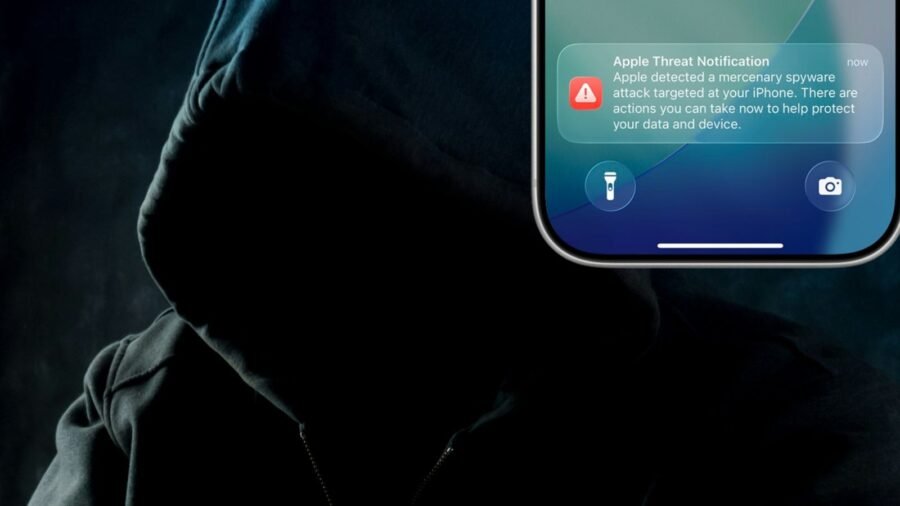
Apple has confirmed that it sent out a fresh batch of threat alerts to hundreds of customers this week, warning them that their iPhones and other devices are suspected to have been hacked by ‘mercenary spyware’.
The iPhone-maker said that it sent out the spyware threat notifications on Thursday, August 13 to potential victims in over 110 countries. It is unclear if India is among the markets covered. Apple device owners in over 150 countries have received a spyware threat notification to date, according to the Cupertino-based tech giant.
Apple notifies users directly on their iPhone lock screen with a push notification that urges the user to take action, as per a new support article on an official web page. Users may also receive notifications by email and when they log in to their Apple account.
A spyware threat notification sent by Apple is most likely to read as follows : “Apple detected a mercenary spyware attack targeted at your iPhone. There are actions you can take now to protect your data and device.”
In order to make it easier for potential spyware victims to access key information on what to do next, Apple has reportedly updated the user experience to provide options to reach out for help or go into ‘Lockdown Mode’.
While Apple has not attributed the recent wave of targeted spyware attacks to any stakeholder, governments have been known to carry out State-sponsored spyware hacking campaigns to surveil users since the explosive revelations about Israeli NSO Group’s controversial Pegasus malware a few years ago.
Apple, on more than one occasion, has alerted its customers that their iPhones, iPads, or Macs might have been compromised with spyware. And every time, it revives fears of how far government-used spyware has spread around the world, including in India.
Story continues below this ad
These potential spyware attacks also underscore the proliferation of surveillance technology in recent years, which has been abused by governments and deployed against critics, including members of civil society.
For Apple, security and privacy are central to its brand, making spyware a particularly important threat to identify and safeguard against. Android, on the other hand, has a more fragmented security landscape and users are less likely to be alerted about suspected spyware threats, despite the core operating system being open-source.
ALERT: Did you get a notification like this today?
Seek expert security help asap!
Apple just sent out a fresh round of threat notifications about mercenary spyware.
That means tech like Pegasus used by governments to spy on you.
Here are steps to take right now 1/ pic.twitter.com/KFnZW3itFJ
— John Scott-Railton (@jsrailton) August 13, 2026
Calling Apple’s spyware threat alerts a ‘big improvement’ in urging people to seek help to secure their devices, John Scott-Railton, a senior researcher at digital research group Citizen Lab, said, “Notifications create a critical signal that a community is being targeted. People get an alert, and then some of them reach out and seek help. Often this kicks off an investigation that reveals many, many more cases.”
Citing the ongoing scandal in Poland over the former government’s use of spyware against its rivals, Scott-Railton said that without Apple’s notifications, “that entire massive scandal about spyware abuse in the Polish election wouldn’t have been uncovered.”
What should users know?
Did you receive a threat notification from Apple about mercenary spyware recently? If the answer is yes, follow the steps mentioned below:
Story continues below this ad
-Go to your iPhone Settings to double-check if an Apple spyware threat notification was sent to you.
-If you’re worried an iPhone notification might be fake, go to accounts.apple.com to verify.
-Once the notification is confirmed as real, it means that you were potentially targeted by Pegasus-style mercenary spyware.
-If you think you are at real risk of being targeted by spyware, you can enable Apple’s Lockdown Mode on your iPhone or iPad. Open the Settings app > Tap Privacy and Security > Scroll down, tap Lockdown Mode, and then turn on Lockdown Mode
-If you are unsure of enabling Lockdown Mode, Apple also offers additional guidance on how to make your device secure.
Note, receiving an Apple threat notification alone does not confirm you have been successfully hacked using spyware. However, you should still take immediate steps to protect your device and data.
Apple’s efforts against spyware
Alongside the debut of its iPhone 17 lineup and the first-ever iPhone Air in 2025, Apple announced that it has made a series of changes in its A19 and A19 Pro chips, operating system, and development tool to offer a new type of protection known as Memory Integrity Enforcement (MIE) against sophisticated spyware attacks.
MIE is built to detect and patch security exploits in device memory, with Apple claiming that this makes it harder for threat actors to compromise iPhones using spyware. It is built on the Enhanced Memory Tagging Extension (EMTE), which is a modified version of a tool first introduced by Arm to help find memory corruption bugs in hardware.
Story continues below this ad
Apple also said that MIE is the industry’s first-ever comprehensive, always-on memory-safety protection covering key attack surfaces including the kernel and over 70 userland processes.
Meanwhile, Lockdown Mode was first rolled out as part of iOS 16 back in 2022. When users temporarily enable Lockdown Mode on their phones, it switches off link previews in text messages, which hides a person’s anonymity by obtaining their IP addresses. The feature doesn’t block a link, just the preview, so users can still copy and paste the web address into their browser.
Lockdown Mode also disables certain features in Safari that might affect some websites. When it is turned on, you cannot receive FaceTime calls from contacts if the user has not previously sent the initiator a call or request. You will also not receive Apple service invitations, like calendars and notes, from those people you haven’t communicated with before.

US govt sites as targets, evading CAPTCHAs: What OpenAI’s runaway agents got up to
By Sohail Khan · 27 Sep
HP OmniPad 12 review: A promising comeback that needs more polish
By Sohail Khan · 27 Sep
Movies feel different on the right screen, and these 5 TVs are made to bring that magic home
By Sohail Khan · 27 Sep