That dream projector setup can quickly disappoint if you make these 5 mistakes before bringing the big screen home
Editorial independence is core to our work. Some links may earn us a commission, without influencing our opinions.
That dream projector setup can quickly disappoint if you make these 5 mistakes before bringing the big screen home
Choosing a projector is about more than 4K and brightness. The right technology, placement and setup features can make your home cinema far better.
Updated on: Aug 24, 2026, 18:12:30 IST
Prefer HTon Google
Share via
Copy link
Our Picks
FAQs
Our Picks
| Product | Rating | Price |
|---|---|---|
Lumio Arc 7 Portable Home Projector | Official Google TV + Netflix | Native 1080p Full HD | Sealed Light Engine | 400 ANSI Lumens | 4K Support | Auto Keystone | Dolby Audio | 16W Bluetooth SpeakerView Details
|
₹33,990 |
|

|
Check Offers | |
| XGIMI Halo+ GTV Portable Projector, New Launch, Google TV with Licensed Netflix, 700 ISO Lumens, 2 x 5W Harman Kardon Speakers, Auto Focus, ISA, Wi-Fi, Built-in Battery with 2.5 Hours PlaytimeView Details
|
||
|
|
Check Offers | |
|
Unlock Personalized ₹5,665x 6 months₹33,990
|
||
| BenQ GP520 4K 4LED Smart Home Entertainment Projector, 2600 ANSI Lumens,Excellent Colors 98% REC 709,Upto 200" Screen Size, 24W Speakers,Certified Google TV, HDMI 2.1,USB-C, BlackView Details
|
₹1.25L |
|
|
|
Check Offers | |
| LG CineBeam Q HU710PB 4K Smart Portable Floodlight, Auto Screen Adjustment, Auto Focus, RGB Laser, up to 154% DCI-P3, 450,000:1 Contrast Ratio, Built-in Speakers, HDR10, HDMI, USB, HIDView Details
|
₹1.41L |
|
|
|
Check Offers | |
| XGIMI Horizon 20 Max 4K RGB Triple Laser Home Theater Projector, 5700 ISO Lumens, Google TV with Netflix, Dolby Vision, IMAX Enhanced, Optical Zoom, Lens Shift, 300" DisplayView Details
|
₹2.80L |
|
|
|
Check Offers |
 100% Secure
 Flexible EMI Tenure
Research-Backed Choices
Every product we recommend is chosen through a combination of Primary Research and Secondary Research.
Make your next Purchase
at ₹2,500/month
Check Eligibility →
Projectors can make home entertainment more flexible, but choosing one can be less straightforward than it first appears. Models that look similar can be designed for very different rooms and viewing setups, while specifications can be presented in ways that are not always easy to compare. That can make it difficult to know which details to focus on before making a purchase. The same applies when setting up the projector, as seemingly small differences can affect how easily it fits into your space. With more options available across different price ranges, it is easy to focus on the wrong details when comparing models. This guide looks at five common areas where buyers can make mistakes when choosing a projector, helping you approach the purchase with a clearer understanding of what to check.
1. Comparing brightness figures without checking how they are measured
Brightness is one of the most important projector specifications, yet it is also one of the easiest to misunderstand. Manufacturers can quote brightness in ANSI lumens, ISO lumens, LED lumens, or simply lumens, and these figures are not directly interchangeable.
ANSI lumens use a standardised measurement method, making them particularly useful when comparing projectors that use the same standard. LED lumens are measured differently, so a projector with a high LED-lumen figure cannot automatically be considered brighter than one with a lower ANSI-lumen rating.
A rough comparison sometimes used for LED lumens is to divide the figure by 2. 2.4 to estimate an equivalent ANSI- lumen value. This should be treated only as a general guide, not an exact conversion.
ISO lumens create another point of confusion. There is no universal formula for converting ISO lumens to ANSI lumens, because testing methods can vary slightly. A rough guide sometimes used is that ISO lumens are approximately 0. 0.8-0. 0.9 times ANSI lumens. In other words, a projector rated at 1,000 ISO lumens may correspond to roughly 800-900 ANSI lumens. This is only an approximation.
The safest way to compare projectors is to look at models that use the same brightness standard rather than relying heavily on conversion figures.
You should also consider the room where the projector will be used. A completely dark home theatre can generally work with 1,500 to 2,000 ANSI lumens, while rooms with moderate ambient light may need 2,000 to 3,000 ANSI lumens. For spaces with significant ambient light, such as rooms with large windows or for outdoor daytime viewing, 3,500 ANSI lumens or more may be necessary.
Contrast ratio is another important part of the picture. It measures the difference between the brightest whites and the darkest blacks a projector can produce. Higher contrast can make dark scenes look deeper and preserve more detail in shadows. A 3,000:1 contrast ratio is a useful starting point, while serious home theatre setups can benefit from 10,000:1 or higher.
2. Picking projection technology without considering its strengths
Projectors generally use either DLP or LCD technology, and the difference can affect image quality, size and performance.
LCD projectors pass light through LCD panels to create the image. They generally offer good sharpness, efficiency and colour accuracy, making them suitable for viewers who prioritise colour reproduction. However, LCD projectors can be bulkier and may offer lower contrast than comparable DLP models.
DLP projectors use a digital micromirror device containing tiny mirrors that rapidly move to control the light used to create the image. They tend to be more compact and can offer higher contrast and lower input lag, making them attractive for gaming.
Some single-chip DLP projectors use a colour wheel to produce different colours. This can create a rainbow effect that some viewers notice in certain scenes. It does not affect everyone, but it is worth considering when choosing between technologies. Three-chip DLP projectors use separate chips for red, green and blue, avoiding the colour-wheel approach.
The light source is another important distinction to check. Lamp projectors are generally more affordable and often use replaceable lamps, but they take some time to reach full brightness and have a limited lifespan. Laser projectors can reach full brightness almost immediately and offer much longer light-source life, although they typically cost more.
3. Assuming every projector labelled 4K delivers the same resolution
Resolution determines how much detail a projector can display, but the number listed on the product page does not always tell the full story.
For many home users, the choice comes down to 1080p or 4K. A 1080p projector can deliver a sharp image for movies, streaming and gaming, and it generally costs less. It can also be a sensible choice for gaming, where input lag and refresh rate may be more important than the highest possible resolution.
A 4K projector can provide more detail, particularly when displaying movies and other high-quality content on a large screen. However, not every projector marketed as 4K has native 4K resolution. Some models use pixel-shifting technology to simulate a 4K image.
Pixel shifting does not necessarily make a projector unsuitable for movies or TV. However, it can affect the refresh rates available at higher resolutions, which may matter if gaming is one of your main uses.
Checking whether a projector uses native or pixel-shifted 4K gives you a clearer understanding of the resolution you are actually getting.
Loading Suggestions…
Loading Suggestions…
Loading Suggestions…
Loading Suggestions…
4. Ignoring throw distance and buying for a screen size your room cannot support
The distance between a projector and the wall or screen determines how large the projected image can be. This relationship is described by the throw ratio, which indicates how far the projector needs to be placed to produce a particular image size.
Ignoring throw distance before buying can leave you with a projector that cannot create the screen size you want within the available space.
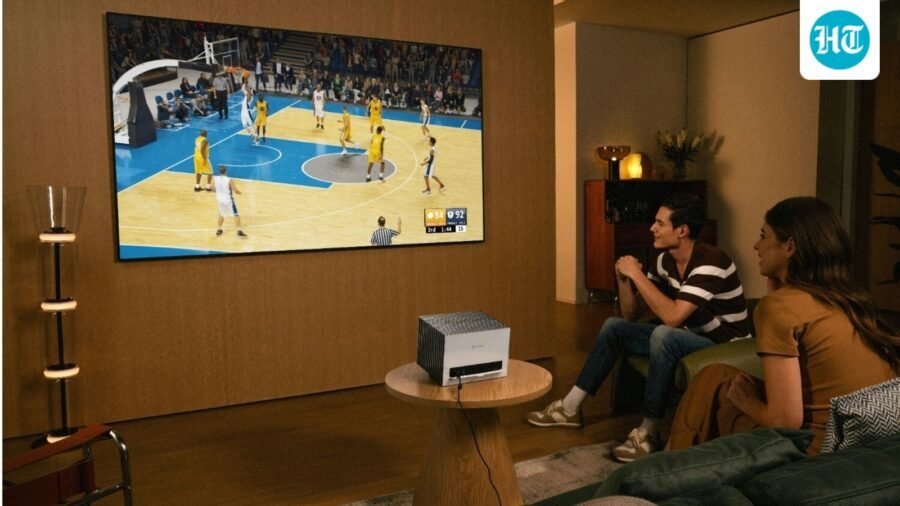
Short-throw projectors can produce large images from relatively short distances, making them useful for smaller rooms. Ultra-short-throw projectors can sit just inches from the wall, which can be particularly convenient in living rooms with little space for a traditional projector setup.
Standard-throw projectors need more distance but generally offer greater flexibility when you have enough room to position them farther away.
Before buying, measure the distance available between the projector and the intended screen or wall. Then check the projector's throw ratio and supported image sizes to make sure they work together.
5. Treating keystone correction and autofocus as unnecessary extras
Setup features can make a significant difference to how easy a projector is to use, particularly when you do not have complete freedom over where it can be placed.
Keystone correction digitally adjusts the projected image so it appears rectangular even when the projector is positioned at an angle. This is useful when the projector cannot sit perfectly square to the screen and can save you from repeatedly moving the device to achieve a properly aligned image.
Some newer projectors also offer 3D keystone correction, which can adjust the image across multiple directions rather than correcting only one axis. This gives you more flexibility when the projector is placed off-centre or at an awkward angle.
Autofocus is similarly useful for home setups. Instead of manually adjusting the focus every time the projector is moved, the system can automatically sharpen the image. Some projectors also offer autofocus shift, allowing the image to be refocused or repositioned more conveniently when the projector's position changes.
These features are particularly useful for portable projectors or for rooms where the device cannot be permanently aligned. Keystone correction can slightly affect image quality because it digitally modifies the picture, so physically positioning the projector correctly remains preferable when possible. However, having good keystone and autofocus tools can make everyday setup considerably easier when ideal placement is not practical.
Conclusion
A good home projector is not simply the one with the highest specifications or the biggest price tag. The better choice is the one that suits your room, viewing habits and setup. Checking brightness standards, projection technology, resolution, throw distance and setup features beforehand can help avoid compromises later. Paying attention to these details also makes it easier to compare projectors beyond their headline features, helping you choose a model that delivers a better viewing experience without unnecessary spending.
Q1. Do I really need autofocus and keystone correction?
They are useful if your projector will be moved frequently or cannot be positioned perfectly in front of the screen. Autofocus speeds up image alignment, while keystone correction can straighten the image when the projector is angled. These features add convenience, although proper physical placement remains preferable for the best image quality.
Q2. Should I buy a standard-throw, short-throw or ultra-short-throw projector?
Base this decision on the space available between the projector and the screen. Standard-throw models suit deeper rooms, while short-throw and ultra-short-throw projectors are better suited to smaller spaces where the projector needs to be closer to the wall.
Also Read:
I used a 4K projector for weeks and realised the resolution is not everything
Best 32-inch smart TVs in India 2026: Top picks across budgets for sharper viewing, smart features and entertainment
I compared 2.1, 5.1 and Dolby Atmos soundbars – Here’s which one is actually worth buying
FAQs for choosing the right projector
A 1080p projector is a sensible choice if you want good picture quality without stretching your budget. A 4K model is worth considering for larger screens and high-quality movie content, where the additional detail is easier to appreciate.
For most home users, a laser projector is the better choice if the budget allows. It offers instant start-up, a longer light-source lifespan and consistent brightness. LED models can be attractive for compact setups, while lamp projectors can make sense when keeping the initial cost low.
Contrast matters most if you watch movies in a dark room, where deeper blacks and better shadow detail can make the image look more cinematic. However, advertised contrast figures are not always directly comparable between brands, so do not choose a projector based on this number alone.
See Less
What is a kill switch, and why is it hard to build one for AI systems?
By Sohail Khan · 20 Sep
A smartwatch should fit your routine, not interrupt it. These five models go the extra mile
By Sohail Khan · 20 Sep
Nike Alphafly 4: 5 things (including the science) behind new marathon shoes
By Sohail Khan · 20 Sep