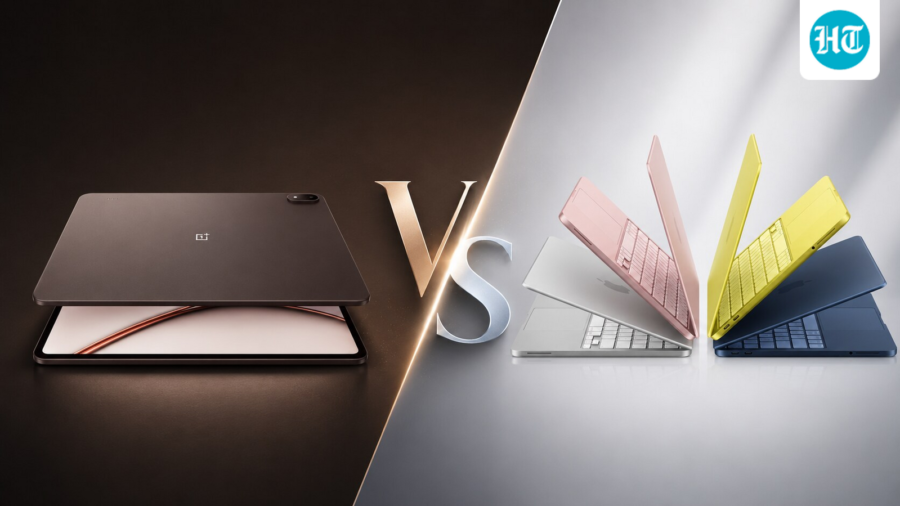
Tablet or laptop? The better choice depends on how you work, relax and use your device
Editorial independence is core to our work. Some links may earn us a commission, without influencing our opinions.
Tablet or laptop? The better choice depends on how you work, relax and use your device
Tablets and laptops have never been this closer, yet the differences become clearer when one device has to do it all.
Updated on: Aug 17, 2026, 14:41:45 IST
Prefer HTon Google
Share via
Copy link
Our Picks
FAQs
Our Picks
| Product | Rating | Price |
|---|---|---|
XIAOMI Pad 8 Nano Texture Display [Smartchoice] Flagship Snapdragon 8s Gen 4 |11.2" 3.2K | 12GB, 256GB | Anti-Reflective | Ultra Slim Metal Design | 9200mAh Battery HyperAI | Wi-Fi 7 | Graphite GreyView Details
|
₹42,999 |
|

|
Check Offers | |
| OnePlus Pad Go 2, [Smartchoice] | 30.73 cm (12.1 inch) 2.8K Display, Dolby Vision™, 120Hz Refresh Rate, Quad Speakers, AI, 10050 mAh Battery, 5G Tablet, 8GB RAM 256 GB Storage, Shadow BlackView Details
|
||
|
|
Check Offers | |
|
Unlock Personalized ₹7,167x 6 months₹42,999
|
||
| OnePlus Pad 4, Snapdragon® 8 Elite Gen 5 Platform, 33.53cm 13.2" 3.4K Screen, 144Hz Adaptive, 8 Speakers, AI Powered, PC-Level Productivity, 13,380 mAh Battery, 8GB + 256GB, WiFi,Dune GlowView Details
|
||
|
|
Check Offers | |
| Apple iPad Air 27.59 cm (11″) (M4): Liquid Retina Display, 128 GB, 12MP Front/Back Camera, Wi-Fi 7 with Apple N1, Touch ID, All-Day Battery Life — Space GrayView Details
|
₹89,900 |
|
|
|
Check Offers | |
| Lenovo IdeaPad Slim 3X – 2025 – Everyday AI Laptop – Copilot+ PC – 15.3" WUXGA Display – 16 GB Memory – 512 GB Storage – Snapdragon® X – Luna GreyView Details
|
₹66,750 |
|
|
|
Check Offers |
 100% Secure
 Flexible EMI Tenure
View More

Research-Backed Choices
Every product we recommend is chosen through a combination of Primary Research and Secondary Research.
Get your new Laptop
at ₹5,000/month
Check Eligibility →
Choosing between a tablet and a laptop has become less straightforward as tablets have become more capable. Both types of device can be used for work, entertainment and everyday tasks, but they offer different experiences. The differences become more noticeable when you use either device as your main computer. Factors such as how you work, where you use the device and what you expect from it can all shape that experience. A tablet may feel very different from a laptop, even when both have similar screen sizes and enough power for everyday tasks. This article looks at the two device categories across work and entertainment, focusing on what actually changes when you choose one over the other.
Portability: Tablets Are Easier to Carry
Portability is one of the main advantages of a tablet. A large-screen model can offer a display comparable to a laptop’s while weighing much less. The OnePlus Pad 4, for example, weighs 672g and has a 13.2-inch display. That makes it easier to carry between rooms, take to meetings, or use away from a desk.
A laptop is portable too, but its keyboard, trackpad and larger body add to its overall weight. The difference becomes more noticeable when you carry the device for several hours. Adding a keyboard or mouse to a tablet increases its weight and cost, but the overall setup can still be lighter than a laptop. The trade-off is that you have to buy and carry those accessories separately.
Entertainment: Both Can Be Good
Laptops remain excellent for watching movies and YouTube videos, so a tablet does not necessarily offer a better entertainment experience.
Many tablets priced above ₹30,000 come with stereo speakers, while some offer quad-speaker setups. Despite their slim designs, brands such as Apple, OnePlus and Xiaomi make good use of the available space to deliver fuller audio. Their large displays are also well suited to movies and streaming, with sharp panels, vibrant colours and high refresh rates.
Some tablets also offer features that are less common on laptops. The Xiaomi Pad 8, for example, has a Nano Texture display that helps reduce reflections and glare. This type of finish is usually found on more expensive laptops.
Laptops still have their own advantages. They make it easier to access desktop streaming services, browser-based content and other web platforms. Premium laptops such as MacBooks also have stronger speaker systems, which can deliver fuller, more detailed sound than many tablets. They also offer more flexibility when switching between entertainment and other tasks. A tablet works well for casual viewing, while a laptop remains useful if you want one device to handle a wider range of tasks.
Battery Life: Tablets Can Be Efficient
Battery life depends on the processor, display, software and workload, so there is no clear winner between tablets and laptops. However, tablets can make a lot of sense for people whose work mainly involves writing, browsing, reading, spreadsheets and video calls. These tasks do not usually put sustained pressure on the processor.
Newer tablets combine efficient processors with large batteries. Chips such as Apple's M4 and Snapdragon 8s Gen 4 can handle these workloads without using too much power. When paired with a 9,000mAh or larger battery, they can provide long runtimes during lighter workloads.
The OnePlus Pad 4, for example, uses a 13,380mAh battery and supports 80W charging.
Laptops can also offer excellent battery life. MacBooks with M-series processors are a good example, while Windows laptops using efficient Intel Core Ultra or Qualcomm Snapdragon X processors can also last through a workday. The difference is that these laptops are often more expensive.
For light work, a tablet can therefore provide the battery life needed for a full workday without requiring frequent charging. With heavier tasks such as gaming, video editing or rendering, however, battery life depends more on the workload than on the type of device.
Loading Suggestions…
Loading Suggestions…
Loading Suggestions…
Loading Suggestions…
Performance: Tablets Have Caught Up
Performance is no longer a simple reason to choose a laptop. High-end tablets now use powerful processors that can handle demanding apps, multitasking and gaming. Apple's iPad Pro uses the M4 chip, while premium Android tablets use flagship Snapdragon processors.
Some iPads can even run AAA games such as Assassin's Creed Mirage. These games are optimised for tablet hardware, allowing them to run within the device's limits rather than trying to match a full gaming PC.
However, laptops remain the better option if you want to play proper PC games. They support a much wider range of titles and can use more powerful graphics hardware.
If you edit large video projects, work with 3D models, develop software or use specialised professional applications, a laptop is usually the safer choice. The hardware may be capable, but software can still be a limitation.
Loading Suggestions…
Loading Suggestions…
Loading Suggestions…
Loading Suggestions…
Software and File Management: Laptops Still Have an Edge
Software is where the difference between tablets and laptops becomes most noticeable. iPadOS has improved considerably, and the Files app now supports folders, external drives, file servers and cloud storage.
Android tablets offer similar basic tools through the Files app. Users can browse, copy, move, rename and delete files stored on the tablet or on connected USB drives.
However, Windows and macOS remain more flexible for managing large numbers of files, downloads and folders. Moving files between drives, working with different file types and organising large projects is generally easier on a laptop.
The same applies to professional software. iPads have access to several professional apps for video editing and creative work, but many are scaled-down versions of desktop software. Android tablets have an even bigger gap to bridge, with several professional applications still unavailable.
Blender, for example, is developing an Android version of its 3D graphics software, but support for professional desktop applications remains limited on Android tablets. This matters if your work depends on full versions of video editors, development tools, 3D software or other specialised applications.
Tablet vs Laptop: Which One Should You Buy?
A tablet makes sense if portability, battery life, entertainment and light productivity are your main priorities. A good tablet with a keyboard can handle writing, browsing, spreadsheets, presentations, video calls and streaming.
A laptop is the better choice if you need desktop software, flexible file management, serious gaming or demanding creative tools. It is simpler if you want a built-in keyboard and trackpad.
The decision ultimately depends on how you plan to use the device. If most of your work happens in a browser, office apps and streaming services, a tablet can handle many everyday tasks. If your work depends on specialised software, complex file management or demanding applications, a laptop remains the more practical choice.
Q1. Which is better for everyday work: a tablet or a laptop?
If your work mainly involves browsing, writing, emails, spreadsheets and video calls, a tablet can handle it with a keyboard. For long typing sessions, heavy multitasking, complex file management or desktop software, a laptop is the better fit.
Q2. Should I buy a tablet or laptop if I want one device for work and entertainment?
A tablet is a good choice if portability and streaming are important and your work is relatively light. A laptop makes more sense if you also need desktop apps, extensive file management, gaming or more demanding work.
Also Read:
I stopped carrying a laptop after trying these tablets for work, writing and everyday productivity
My laptop was constantly lagging—switching to AMD Ryzen made a huge difference
iPad vs Samsung Galaxy Tab: Which one Should you buy in 2026 for work, study and entertainment
Tablet or Laptop? Key Questions Before You Buy
A tablet can handle writing, documents and spreadsheets, but long typing sessions are generally easier on a laptop because it has a built-in keyboard and trackpad. A tablet makes more sense when touch, portability and lighter workloads are more important.
Yes. Modern tablets can connect to external storage and, depending on the model and operating system, external displays and other accessories. However, laptops generally offer more ports and broader support for peripherals without requiring adapters or hubs.
A keyboard can make a tablet much better for productivity, but it does not give it the same software or file-management flexibility as a laptop. The tablet can become a useful laptop alternative for lighter work, but the underlying operating system still matters.
See Less

What is a kill switch, and why is it hard to build one for AI systems?
By Sohail Khan · 20 Sep
A smartwatch should fit your routine, not interrupt it. These five models go the extra mile
By Sohail Khan · 20 Sep
Nike Alphafly 4: 5 things (including the science) behind new marathon shoes
By Sohail Khan · 20 Sep